
United Kingdom
+44 (0) 1628 660600
hello@creative-computing.co.uk
hello@creative-computing.co.uk

For most businesses, data is everywhere - but insight is elusive. Sales figures sit in one system, customer activity in another, and operational metrics somewhere else entirely. Teams spend hours pulling reports together, only for the picture to be out of date by the time decisions get made.
Microsoft's Power BI and Dynamics 365 integration changes that equation entirely. Instead of exporting data and waiting, your people see live, interactive dashboards right inside the tools they already use every day. The result? Faster decisions, fewer bottlenecks, and a business that responds to what's actually happening - not what happened last week.
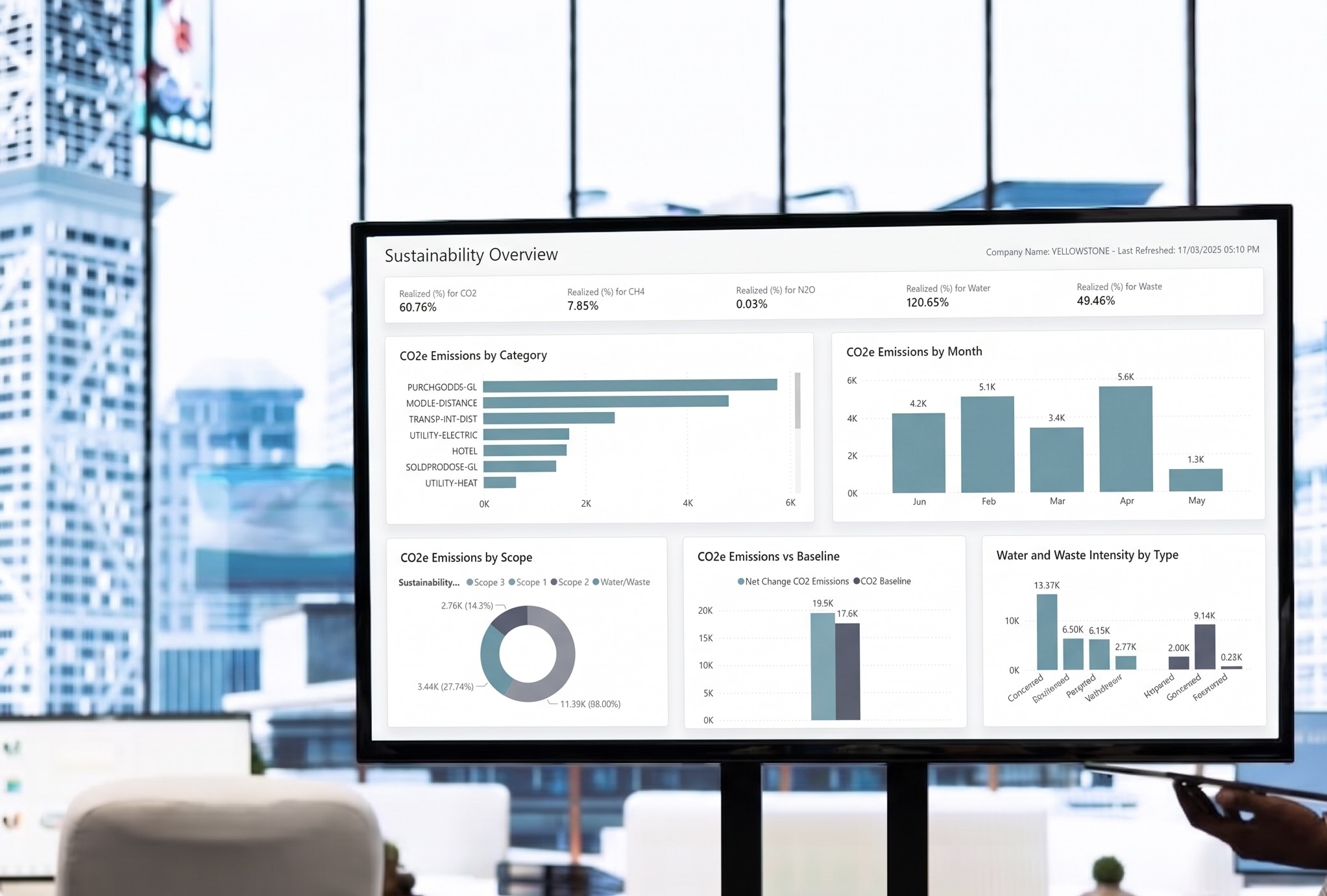
Power BI embedded analytics allows interactive dashboards and reports to surface directly within the Dynamics 365 interface - so your teams never need to leave their workflow to access business intelligence. Whether you're working in Sales, Customer Service, Finance, or Operations, relevant insights are right where they're needed.
Real-time data visualisation means dashboards reflect live data, not a snapshot from yesterday's export. Interactive charts, drill-down capabilities, and dynamic filters allow users to explore the numbers themselves - asking their own questions rather than waiting for a scheduled report.
Automated reporting removes the manual effort of routine reporting cycles entirely. Scheduled refreshes, alert-based notifications, and pre-built report templates mean your team spends less time building reports and more time acting on them.
AI-powered DAX (Data Analysis Expressions) support lowers the barrier to sophisticated analysis - even for users who aren't data specialists. With AI assistance suggesting formulas and explaining logic in plain language, building meaningful measures becomes accessible across your organisation.
Workspace permissions are managed centrally through Microsoft Entra ID, keeping access to sensitive dashboards controlled, auditable, and aligned with your existing security policies.
One of the greatest strengths of the Power BI Dynamics 365 integration is how naturally it connects across the Microsoft ecosystem - and well beyond it.
Microsoft 365 (Teams, Excel, SharePoint) Dashboards can be pinned inside Teams channels for real-time visibility during meetings. Excel users can connect directly to Power BI datasets, maintaining spreadsheet familiarity with governed data. SharePoint pages can host embedded reports, making insights accessible across your intranet. Learn more about Microsoft 365 integration capabilities →
Power Platform (Power Apps, Power Pages) Power Apps can surface Power BI visuals within custom business applications. Power Pages allows reports to be embedded in external-facing portals - useful for partner dashboards or client reporting. Logic built once flows across multiple applications without duplication.
325+ External Data Sources Power BI connects to over 325 external sources via native connectors and live API integrations - including Salesforce, SQL Server, Jira, Google Analytics, SAP, and Snowflake. Real-time API connections mean dashboards reflect what's happening now, not on a batch schedule. View the full Power BI connector library →
Internal link suggestion: Link "Salesforce integration" or "SQL Server" to any relevant CCS services pages covering data migration or CRM implementation.
The case for real-time business intelligence inside Dynamics 365 isn't just technical - it's operational.
Better decision-making: When decision-makers see live insight within the systems they already use, they act faster and with greater confidence. A sales manager reviewing a pipeline can immediately see which deals are stalling and where revenue is trending - without switching applications or waiting for a report.
Reduced manual reporting: When data flows automatically and dashboards update without human intervention, your analysts shift from report-builders to strategic advisors - freeing up significant time and resources.
Cross-platform visibility: Teams across Finance, Sales, Marketing, and Operations look at the same numbers, derived from the same source. Disagreements born from mismatched spreadsheets become a thing of the past.
A single source of truth: Embedded Power BI creates one consistent, governed data environment that every team trusts. Collaboration improves when people share a common picture of reality.
Internal link suggestion: Link "single source of truth" or "data governance" to a CCS blog or services page on Microsoft data strategy or Dynamics 365 implementation.
Q: Do I need a separate Power BI licence to use it inside Dynamics 365? A: It depends on how reports are embedded and who needs to interact with them. Some scenarios are covered by existing Dynamics 365 licences, while others require Power BI Pro or Premium capacity. Microsoft's licensing guide covers the options in detail - and we're happy to advise on the right fit for your setup.
Q: Can Power BI connect to data outside of Microsoft systems? A: Yes. Power BI supports over 325 data connectors, including Salesforce, Jira, Google Analytics, SAP, Snowflake, and many more. Live API connections allow real-time data flow from non-Microsoft platforms directly into your Dynamics 365 dashboards.
Q: How long does it take to implement Power BI inside Dynamics 365? A: Timelines vary depending on data complexity, the number of sources being connected, and the level of custom reporting required. A focused initial deployment can often be completed within a few weeks, with further dashboards built iteratively.
Q: Is the data secure when using embedded Power BI dashboards? A: Yes. Access is managed through Microsoft Entra ID (formerly Azure Active Directory), with role-based permissions ensuring users only see the data relevant to them. All data remains within your Microsoft tenant.
At Creative Computing Solutions, we help businesses unlock the full potential of Power BI and Dynamics 365 integration - from initial setup and data source connection through to custom dashboard design and user training.
Whether you're starting from scratch or maturing an existing Microsoft environment, our team can design and deploy the embedded analytics capabilities your business actually needs.


.jpeg)
.png)

.jpg)
.png)
.png)

.png)