United Kingdom
+44 (0) 1628 660600
hello@creative-computing.co.uk
hello@creative-computing.co.uk
If your business is running on an ageing on-premise ERP system - whether that's an older version of Microsoft Dynamics NAV, Sage, or another legacy platform - you've probably started asking some uncomfortable questions. Is this system still fit for purpose? What would it take to move? And is the disruption really worth it?
This guide is for businesses in exactly that position. We'll cut through the noise and answer the questions we hear most often.
On-premise ERP systems were the standard for small and mid-sized businesses for decades. You purchased a licence, installed the software on your own servers, and managed everything in-house - updates, security, backups, and infrastructure. For their time, these systems were solid and reliable.
The challenge today is that the world has moved on. Many of these platforms are receiving reduced investment from their vendors, with support windows narrowing and meaningful development slowing or stopping entirely. Meanwhile, the businesses running them are having to absorb increasing infrastructure costs, IT overhead, and the growing risk that comes with running unsupported software.
Dynamics 365 Business Central is Microsoft's modern cloud ERP for small and mid-sized businesses. If you're coming from Dynamics NAV, it shares the same core financial engine - but it's been rebuilt for the cloud era. For businesses on other legacy platforms, it represents a clean, well-supported destination with a strong long-term roadmap.
Business Central is trusted by over 50,000 companies globally and is available as a fully cloud-hosted SaaS solution or, where genuine on-premise requirements exist, as a locally deployed option.
What sets it apart isn't just where it lives. Business Central receives continuous investment from Microsoft: twice-yearly updates, built-in AI capabilities via Microsoft Copilot, native integration with Power BI, Microsoft Teams, and the wider Microsoft 365 ecosystem, and an expanding AppSource marketplace of certified third-party extensions. It's a platform that grows with you - not one you outgrow.

For most businesses, the cloud deployment removes a significant ongoing maintenance burden and unlocks capabilities that simply aren't available on ageing platforms. That said, if there are genuine reasons to remain on-premise - specific compliance or data residency requirements, for instance - Business Central on-premise is a credible option.
Legacy on-premise ERP systems typically use a perpetual licence model: you pay once (plus annual maintenance fees) and own the software indefinitely. On the surface, this sounds appealing - but it carries hidden costs. Your business bears full responsibility for servers, infrastructure, and applying updates manually.
Dynamics 365 Business Central uses a per-user subscription model. There are two main tiers:
The subscription covers cloud hosting, automatic updates, security patches, and Microsoft support. When you account for the infrastructure overhead that disappears, total cost of ownership typically compares favourably - and often comes out ahead.
The gap between a well-maintained modern SaaS platform and an ageing on-premise system widens every year. The key differences that matter most to growing businesses:
AI and Copilot: Built-in assistance for cash flow forecasting, late payment prediction, bank reconciliation, and more - included at no extra licence cost. These aren't features you'll retrofit onto a legacy platform.
Continuous updates: Microsoft releases two major update waves per year. You're always on a current, improving platform - not falling further behind with every passing month.
Power Platform integration: Native connections to Power BI, Power Automate, and Microsoft Teams enable better reporting and workflow automation without heavy customisation. For businesses still exporting spreadsheets to make sense of their ERP data, this is transformative.
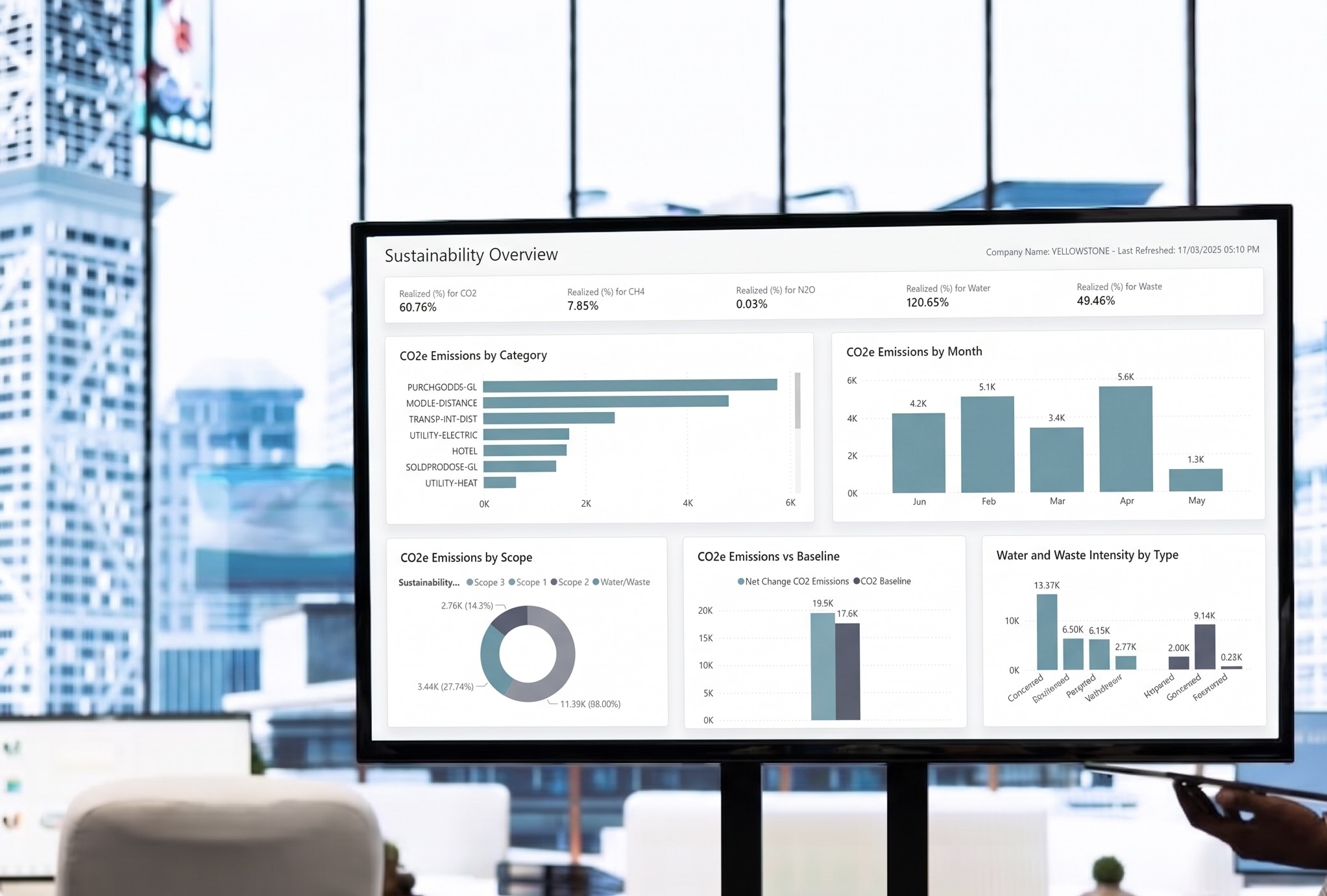
AppSource ecosystem: Hundreds of certified extensions are available, including Creative's own specialist apps for automation, reporting, and sustainability. Where bespoke development was once your only option, a validated extension is often available off the shelf.
Mobile and remote access: Full functionality from any browser or device, without a VPN. For businesses with hybrid or distributed teams, this alone can justify the move.
This is the question businesses often avoid, but it deserves a direct answer.
Running an unsupported or under-supported ERP platform carries compounding risk. Security vulnerabilities go unpatched, creating exposure that grows over time. Regulatory and compliance requirements - VAT changes, payroll legislation, reporting obligations - may not be met without manual workarounds. Auditors and insurers are increasingly asking questions about the systems businesses rely on.
Beyond risk, there's the opportunity cost. Every month spent on a platform that can't support modern reporting, automation, or AI integration is a month your competitors - who've already made the move - are pulling further ahead.
For businesses on Microsoft Dynamics NAV specifically, the timeline is concrete. Microsoft's Fixed Lifecycle Policy means extended support (security patches only) ends on defined dates:
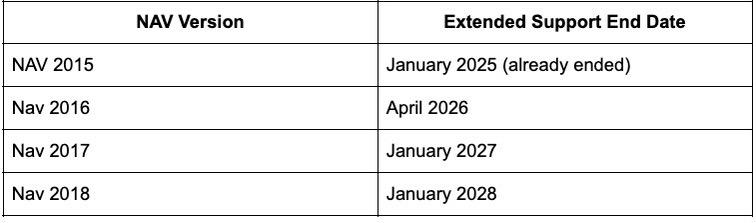
Once extended support ends, Microsoft issues no further updates of any kind. If you're on NAV 2016, that deadline is now imminent. The time to act strategically - rather than urgently - is now.
Migrating from a legacy ERP to Business Central is a meaningful project, but with the right partner it is entirely manageable. For businesses coming from NAV, the process benefits from a shared heritage - data, processes, and much of your business logic can migrate directly. For those moving from other platforms, a well-structured programme ensures nothing is left behind.
A typical migration follows five stages:
Migration timelines vary with complexity. A straightforward environment typically takes 3–4 months; those with significant customisation or integration requirements can take 6–12 months. We'll give you a realistic picture after the discovery phase - before any commitments are made.
Can I stay on my current system and avoid the disruption? Technically yes, but the risks compound over time. Without security patches and vendor investment, your system becomes increasingly exposed. Businesses that delay upgrades almost always face higher costs and more complexity - and the decision eventually gets made under time pressure rather than on their own terms.
Will I lose my customisations? Not necessarily. Customisations are assessed during the discovery phase, and the majority can be rebuilt as Business Central extensions - often improved in the process. You'll receive clear recommendations before any work begins.
Is Business Central only for large businesses? No. It's specifically designed for small and mid-sized organisations. Its scalability means it grows with you - from 5 users to 500.
What industries does Business Central suit? Business Central works well across most sectors. Creative has particular depth in distribution, manufacturing, non-profit, and media.
What if we have compliance or data residency requirements? Business Central's cloud deployment runs on Microsoft Azure infrastructure within your chosen region. Where stricter requirements apply, on-premise or private cloud options are available.
How does SaaS pricing compare to our current perpetual licence? This varies by environment - but for most businesses, once server costs, IT overhead, and the cost of manual updates are factored in, the subscription model compares favourably. We'll walk you through a like-for-like comparison as part of our initial conversation.
At Creative Computing, we've been working with Microsoft Dynamics for over 35 years, with more than 500 software implementations completed. We understand the complexity that accumulates inside a heavily customised legacy system - and we know how to unpick it sensibly, protecting what works while modernising what's holding you back.
Whether you're facing an imminent support deadline or simply recognising that your current platform is limiting your growth, now is the right time to understand your options clearly - and on your terms.
We'll give you a straightforward picture of what's involved, what it costs, and what you'll gain. No pressure, no jargon.

.jpg)

.jpeg)
.png)

.jpg)
.png)
.png)